
 FR
FR DE
DE EN
EN


Tools of navigation
Several elements allow to browse online a training module.
Lesson
Navigation taskbar
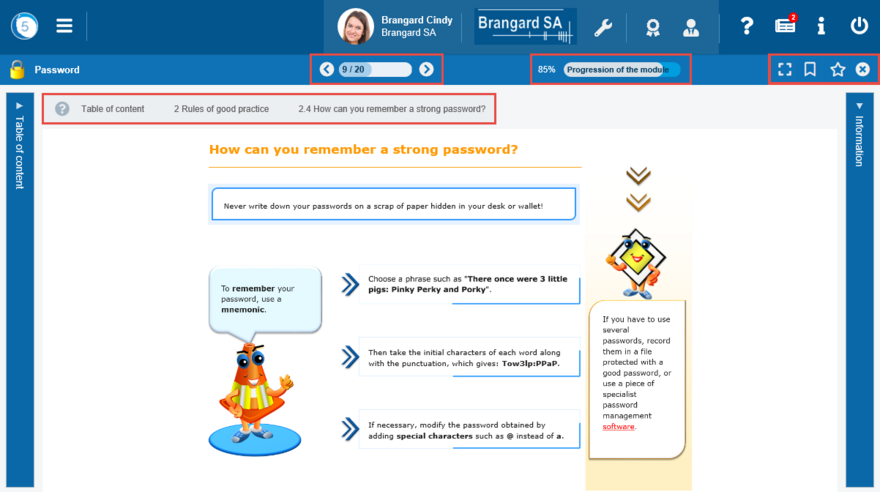
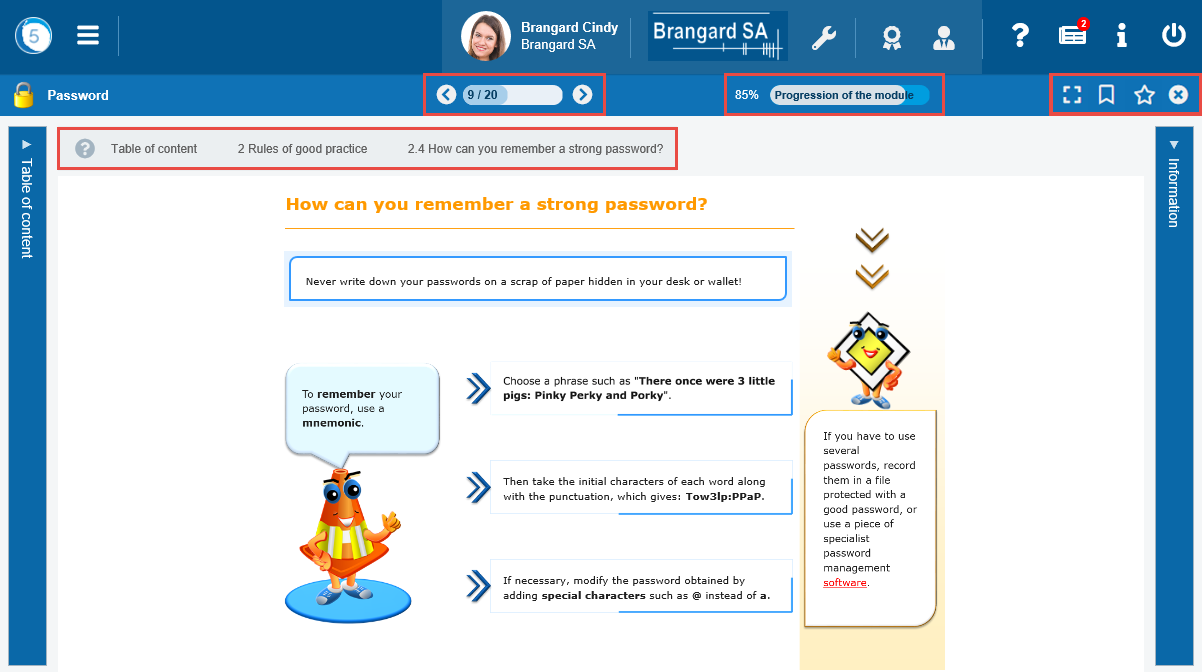
 The arrows allow to move from lessons to lessons (the arrows of the keyboard also). The bar 9/20 indicates the display of the 9th lesson of the module which includes 20 lessons.
Full screen
 Thanks to this button, the user displays the content in full screen thus providing a better reading. Click again on this button to toggle the mode of display.
Favorite
 The Favorite button allows the user to add the current lesson to favorites.
Module progress
 The percentage displays directly the percentage of the progress of the module.
Summary
 The summary button allows you to return to the module summary display.
Closing the module


Use the cross to close the module and return to the Training Plan.
Navigation path


The interactive navigation path allows to situate oneself in the module in progress.
It offers a direct link towards the online help.
It displays the summary of the module, eventually the name of the chapter and the name of the lesson displayed.
The structure of the module can be clicked.