
 FR
FR DE
DE EN
EN


Generalities
Organisation of the files
We recommend that our customers put in place a convention for the naming of the files of module (maximum 20 characters). Indeed, the name given to a module is very important because it identifies it in a unique way in the platform myTeacher.
At CeRFi, for example, the names of the software modules are on 12 characters:
- 2 characters to identify the software corresponding to the module
- 2 characters for the version of the software
- 5 characters to identify the theme of the module
- 1 characters for the code of the language
- 2 characters for the version of the module
For example: GESTEMPF0I for the module on the management of time.
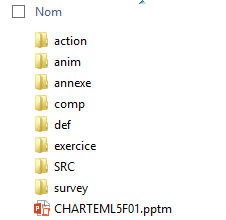
Basic file of a module
The file of the modules are organized in the following way:
-
a folder action containing interactive lessons (format pptm)
-
a folder anim containing all the animations (format HTML5)
-
a folder annex containing the annexed documents (Word, Excel, PowerPoint, pdf, etc.) to the module.
-
a folder comp containing a file comp.docm for all the additions to the module.
-
a folder def containing a file def.docm for all the definitions of the module.
-
a folder exercise containing the zip files of the quizzes myTest.
-
a folder survey containing the survey(s) generated by the platform
-
a folder pptm: also called main file PowerPoint which represents the module strictly speaking.
One must absolutely keep this structure for all the modules so that myTeacher can interpret correctly each element.
It is possible to add two extra files:
-
images : in order to keep all the images used in the module
-
SRC : in order to keep the source files of all the documents which contributed to the conception of the module
These documents can be useful for a later update but they are not taken again by the macro for the creation of the folder of the module.
The access path to the folder must not include more than 250 characters.
The software made use of
The necessary software for the conception of the content are:
- PowerPoint
- Word
- Winzip or compression tool Windows
In addition to these 3 software programs, one can also implement the software Adobe Captivate for the animations.