
 FR
FR DE
DE EN
EN


Creation of a definition
Like for the inter-lessons and inter-modules, the administration of definitions is done thanks to hypertext links.
To create a definition on a word or group of words:
- select it
- open the dialogue box Insert a hypertext link with the keyboard-shortcut Ctrl+K
- enter defXX in the area of address, XX representing the number of the definition entered in the first column of the file def.docm (registered file in the folder def)
The number of the definition must always be indicated on two or three figures. Thus, the first registration will be named def01.
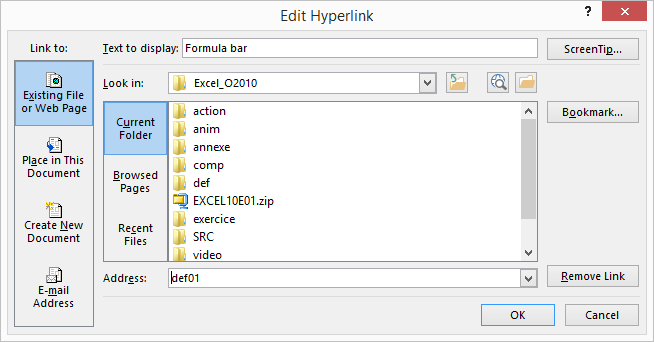
Dialogue box. Insert an hypertext link with creation of a link towards a definition.
The colour of the definition is that of the hypertext link in the scheme of colours.
After the user has clicked on a definition, the colour of the link will change (colour of accentuation of the visited link of the scheme of colours).
The integration of definitions is done the same way in the actions!
The number of definitions in a module is limited to 1'000.